
Connect Telegram
Create a Telegram bot with BotFather and connect it to DinamisAI so customer messages on Telegram arrive in Conversations, ready to answer.
On this page
What you need
- Access to Channels
- A Telegram account on your phone or computer
- Time
- ~4 min
- Steps
- 6
Customers reach your business on Telegram by messaging your own bot. Those messages arrive in Conversations, and replies from your team or AI agent go back through the same bot. You create the bot with BotFather, Telegram's official tool for making bots.
Create a bot and connect it
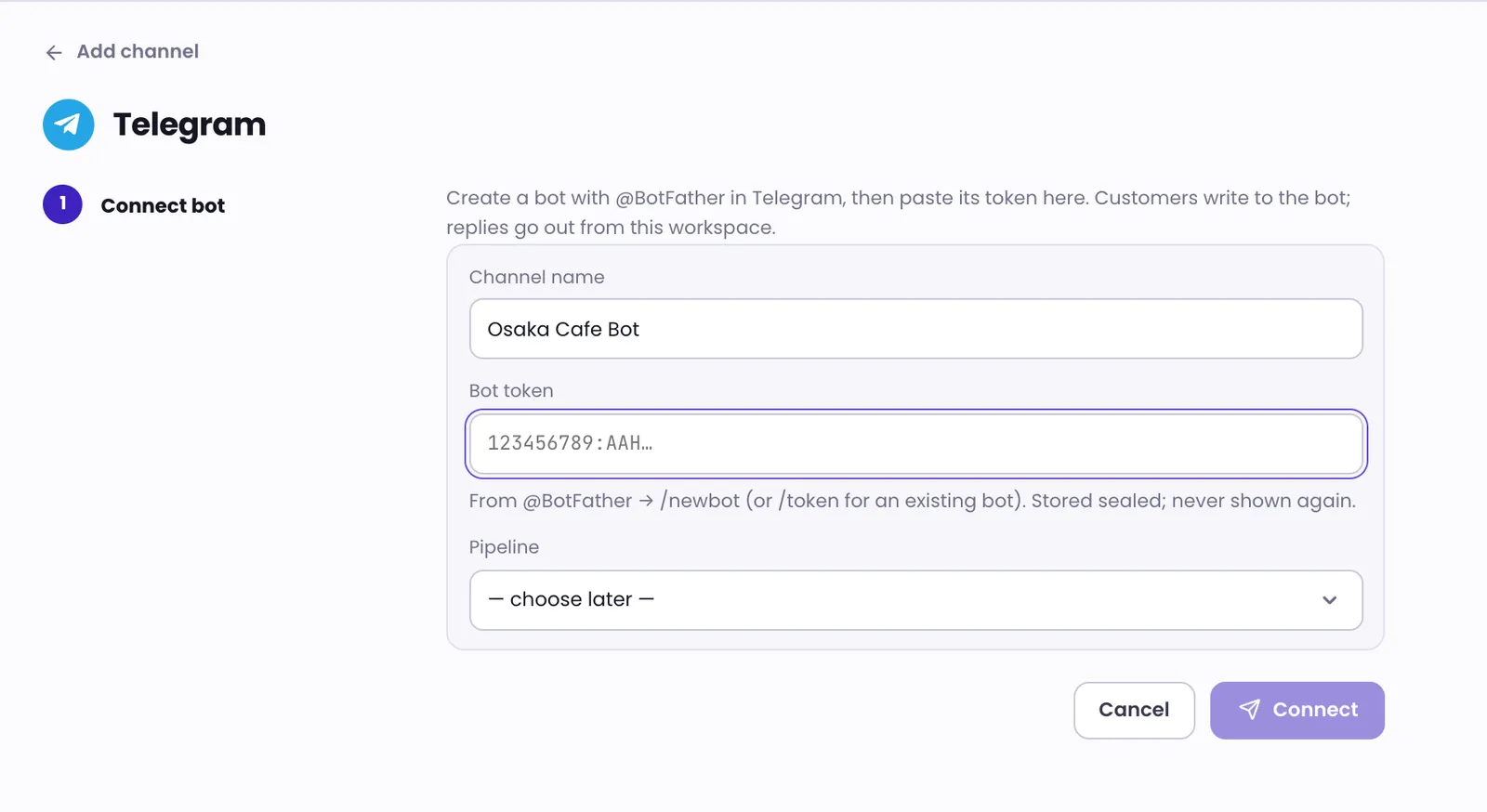
- In Telegram, open a chat with @BotFather and send
/newbot. - Follow BotFather's prompts to give your bot a name and a username. At the end, BotFather sends you the bot's token; copy it.
- In DinamisAI, open Channels, click Add channel, then choose Telegram.
- Fill in the Channel name, then paste the token into Bot token.
- Choose the Pipeline that will handle conversations from this bot, or leave it at — choose later —.
- Click Connect, then message your bot from Telegram to check that the message arrives in Conversations.
Already have a bot? Send /token to @BotFather and choose your bot to get its token.
A bot token gives full control of your bot. Don't share it with anyone. Once saved, DinamisAI stores it securely and never shows it again.
About the pipeline
The pipeline decides which team and AI agent handle conversations from this channel. Roles and access explains how teams and pipelines limit access. If you choose later, conversations from the bot belong to no team until you pick a pipeline. Team members who can only see their own team's conversations won't see them, even the ones assigned to them. Once you choose a pipeline, the bot's existing conversations move into it too. You can choose a pipeline later on the channel's page, in the Pipeline row.
Troubleshooting
Telegram doesn't recognise the token
The token may have been cut off when you copied it. Copy it again from @BotFather, then paste it again.
The bot is already connected to a workspace
A bot can be connected to only one workspace. Create a new bot with @BotFather, or disconnect that bot from the other workspace first.
Was this article helpful?